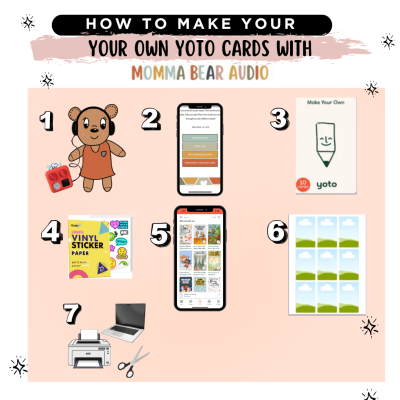
How To Make Your Own Yoto Cards with Momma Bear Audio

Learn how to make your own Yoto cards step-by-step using Momma Bear Audio. This simple guide walks parents through adding audio, linking MYO cards, and creating custom stickers—making it easy and affordable to build your child’s Yoto library at home.

Prefer a visual walkthrough?
Download the full printable guide here.

Instagram Posts - 2026-04-07T153400.473

Affiliate Disclaimer

Some of the links in this post are affiliate links. This means I may earn a small commission if you choose to purchase through them—at no additional cost to you. I only recommend products I personally use and love.

How to Make Your Own Yoto Cards(Step-by-Step Guide for Parents

If you’ve ever wished you could easily add your own audio to your child’s Yoto player… you can—and it’s actually way simpler than it sounds.

In this guide, I’ll walk you through exactly how to make your own Yoto cards using Momma Bear Audio, plus how to add audio, link your cards, and even create custom stickers to make them extra fun.

👉 Prefer a visual walkthrough?
Download the full printable guide here.

What You Need to Make Your Own Yoto Cards

Here’s everything you’ll need to get started:

How to Add Momma Bear Audio to Your Yoto Library

Before linking anything to a card, you’ll first add your audio to your Yoto library.

Step-by-Step:

  1. Log in to your Momma Bear Audio Member account
    👉 [MEMBER LOGIN LINK]
  2. Browse and select the audio you want.
  3. Click the Yoto link for that audio. (This will open a QR code and file page.)
  4. Scan the QR code with your phone.
  5. Tap “Add to Library” on your phone.
  6. That’s it! Your audio is now in your Yoto library and ready to use.
  7. If the playlist is suggesting that you need to download the Yoto app, please see these detailed instructions. It’s an easy fix but there is one extra step.

How to Link Audio to a MYO Yoto Card

Once your audio is in your library, here’s how to put it onto a card:

Step-by-Step:

  1. Open the Yoto App
  2. Tap Playlists
  3. Scroll all the way down to the section labeled “Shared with Me”
  4. Select your Momma Bear Audio playlist
  5. Click “Link to a card”
  6. Choose to link using your phone or Yoto player(I usually use my phone).
  7. Scan your blank MYO card
  8. Wait for the checkmark ✔️

Your card is now ready to play!

How to Add a Custom Sticker to Your Yoto Card

This is where it gets REALLY fun-custom labels make your cards easy to organize and super kid-friendly.

Step-by-Step:

  1. Go back to your Momma Bear Audio account and find the playlist you want to print a label for.
  2. Download the Transcript + MYO Label
  3. Download the label image (Dropbox link if provided)
  4. Open your Canva template
    👉 [CANVA TEMPLATE LINK]
  5. Drop your label image into the template
  6. Print using vinyl sticker paper
  7. Cut out your label
  8. Stick it onto your MYO card
  9. Done!

Why Parents Love Making Their Own Yoto Cards

Making your own Yoto cards gives you:

  • Instant access to affordable audio
  • More control over what your kids listen to
  • A way to use all those blank MYO cards sitting around
  • A fun, creative activity you can even do with your kids

And honestly… once you make one, you’ll want to make a whole stack.

Join our Facebook community!

Looking for other free audio sources, ideas and inspo? Maybe you want to submit a request for some sort of specific audio for your kids? Join my FB Group! I am always taking suggestions and working to get the audio your kids want.

Recently on the Blog

April Audio Roundup

April Audio Roundup!
This month, we’re leaning into intentional silliness, screen-free fun, and joy that fills your home without tricks, pranks, or sugar overload.

Read More »

ZAP

Pick-Your-Path Interactive Story! You are the Zap. You’re a kid with electric powers and one glittery bath-bomb disaster. Now your zap is gone, and every choice you make shapes the story. With 26 endings, secret labs, wild sidekicks, and shocking twists, this adventure is fully powered by you.

Read More »

Valentines Printables

Momma Bear Audio Valentines Day Printables! We have playdough valentines day printable. Use our playdough making audio, make playdough and share with friends and family!

Read More »
Shopping Cart
Scroll to Top